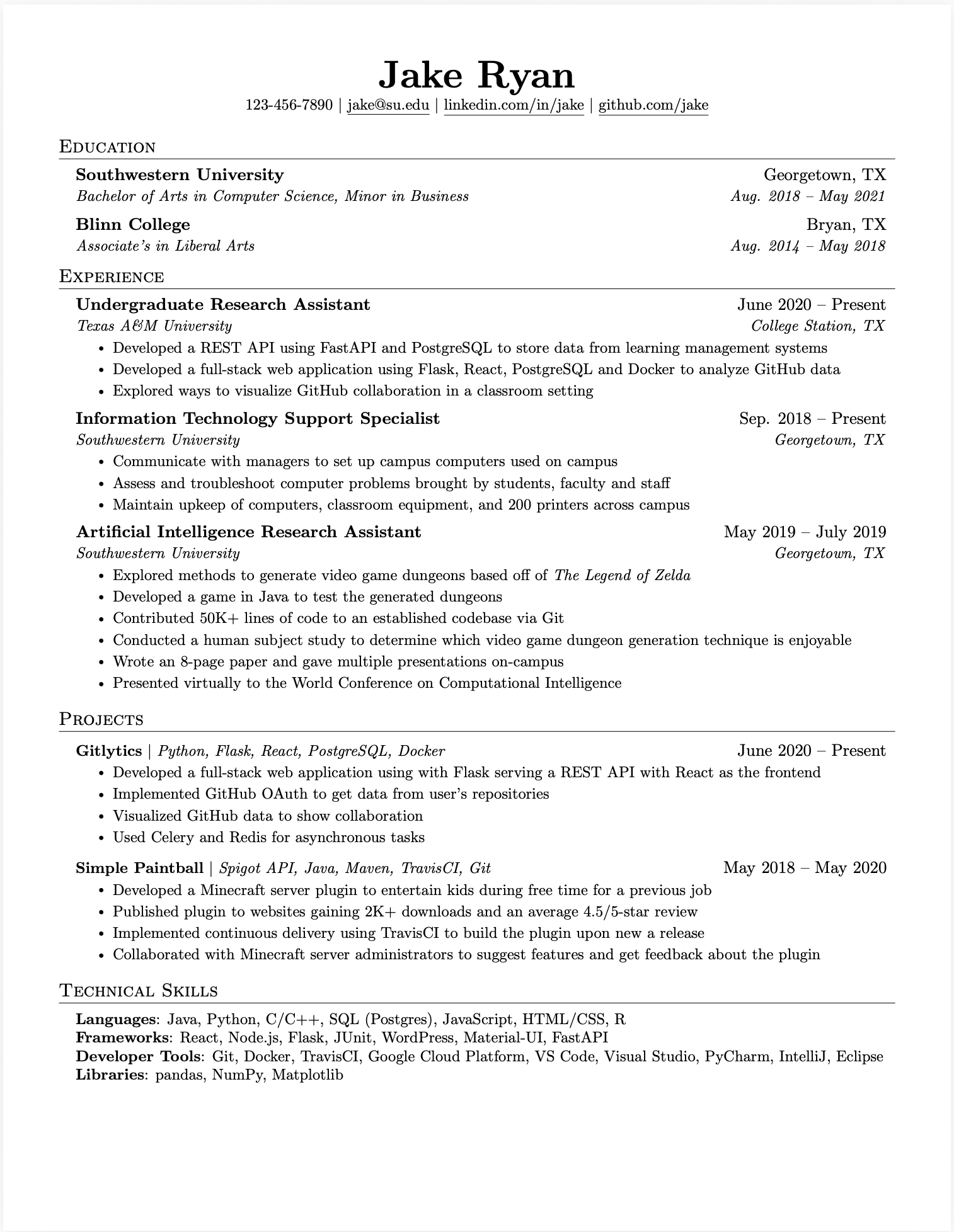
Jake's Resume Template
The clean, ATS-optimized LaTeX resume template trusted by 50,000+ software engineers. Download the PDF or copy the LaTeX code to start building your resume.
How to Use Jake's Resume Template
Get started with one of the most trusted resume formats in tech
Download or Copy
Download the PDF template or copy the LaTeX code to Overleaf
Fill In Your Info
Replace the placeholder content with your experience and skills
Export & Apply
Export as PDF and start applying to your target companies
Convert Your Existing Resume
Upload your current resume and we'll convert it to Jake's Resume format instantly
Drop your resume here
or click to upload (PDF only, max 10MB)
We'll analyze your resume and show you how to improve it
Frequently Asked Questions
Common questions about Jake's Resume template
What is Jake's Resume?
Jake's Resume is a popular LaTeX resume template widely used in the tech industry. It features a clean, single-column layout with Computer Modern fonts, making it highly readable by both humans and Applicant Tracking Systems (ATS). The template became popular on Reddit and GitHub for its professional appearance and proven success in landing interviews at top tech companies.
Why is Jake's Resume so popular for tech jobs?
Jake's Resume is popular because it's ATS-optimized, uses clean formatting that hiring managers love, and has been proven to work at FAANG companies. The minimalist design keeps focus on your experience and skills without distracting graphics. It's also easy to customize and maintains consistent formatting across different PDF viewers.
Is Jake's Resume ATS-friendly?
Yes, Jake's Resume is one of the most ATS-friendly templates available. It uses standard fonts, avoids tables and columns that confuse ATS systems, and structures content in a way that parses correctly. Our SWE Resume builder generates Jake's Resume format that scores 98+ on ATS compatibility tests.
How do I customize Jake's Resume template?
You can customize Jake's Resume in two ways: 1. Download our PDF template and use our AI builder to automatically fill it with your information, or 2. Copy our LaTeX code and edit it directly in Overleaf or your local LaTeX environment. Our builder handles the formatting automatically so you can focus on content.
Can I use Jake's Resume for non-tech jobs?
Absolutely. While Jake's Resume originated in the tech community, its clean and professional format works for any industry. The single-column layout and clear section headers make it versatile for finance, consulting, healthcare, and other fields. The key is the content you put in it, not the template itself.
What's the difference between Jake's Resume and Overleaf templates?
Jake's Resume is actually available on Overleaf, but our version at SWE Resume provides additional benefits: AI-powered content optimization, 1-click ATS scoring, automatic formatting, and the ability to generate the same quality output without knowing LaTeX. You get the proven Jake's Resume format with modern AI assistance.
Build Your Resume with Jake's Template
Use our AI-powered builder to create a perfectly formatted Jake's Resume in minutes
Build Your Resume NowFree to start • No LaTeX knowledge required