Jake's Resume Template
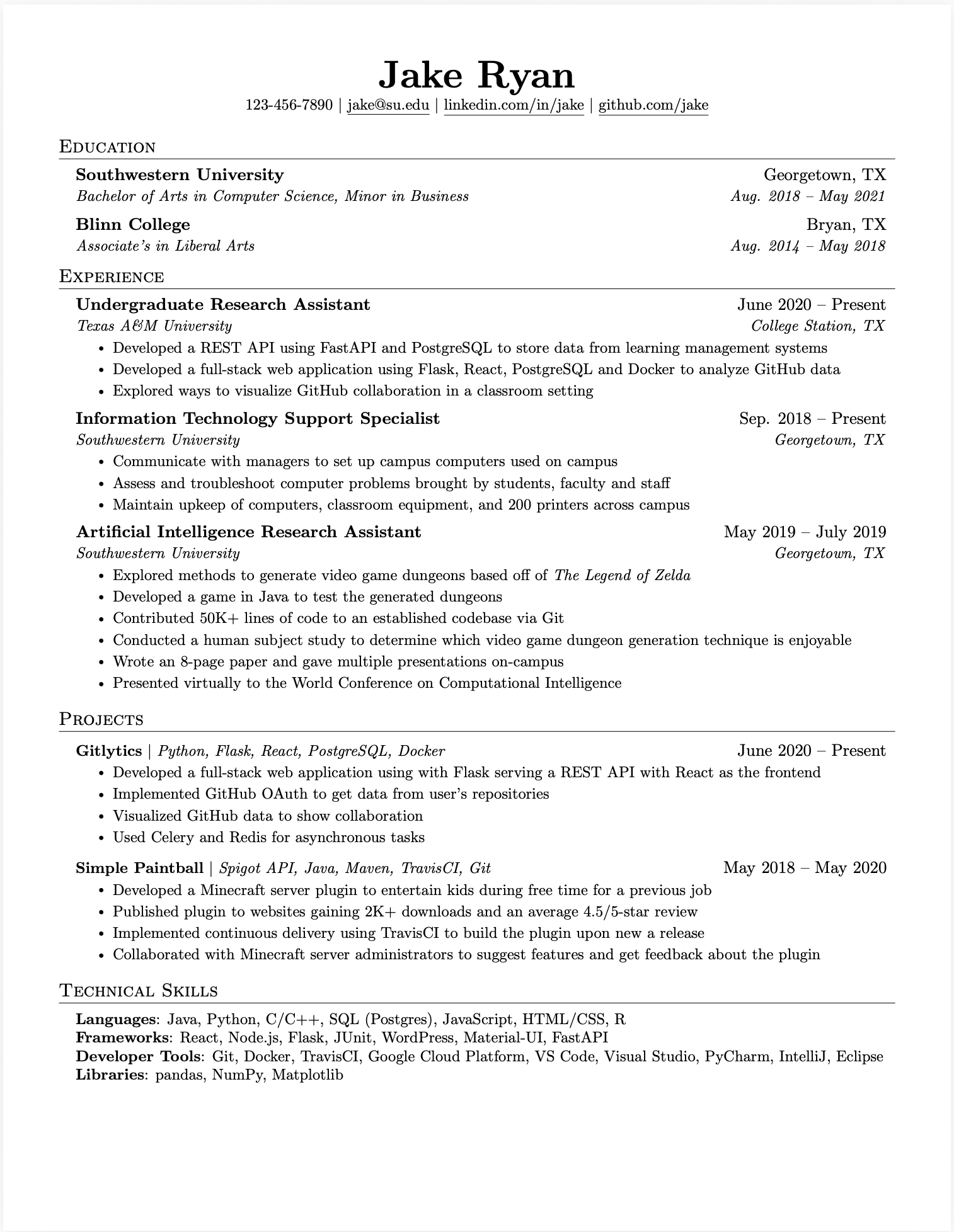
Get the clean, single-column LaTeX template widely known as Jake's Resume. Download the free PDF, copy the code into Overleaf, or convert your existing resume into the same format.
What Is Jake's Resume?
Jake's Resume is a compact, single-column LaTeX resume format widely used by software engineering students and experienced developers. Its conventional headings, restrained typography, and simple reading order keep attention on experience, projects, education, and technical skills.
The template is popular because it solves a practical formatting problem without adding decorative elements that compete with the content. You can download the PDF above to inspect the finished layout, copy the LaTeX source into Overleaf, or import an existing resume and use the same clean structure online.
The format helps with consistency, but the words still determine whether the resume is persuasive. Pair the template with the software engineer resume bullet examples or the Google XYZ resume formula when your experience section still reads like a task list.
How to Use Jake's Resume in Overleaf
- Open a blank Overleaf project and replace its default
main.texfile with the Jake's Resume LaTeX source shown above. - Replace the sample name, links, education, experience, projects, and skills with your own information.
- Keep standard section names and verify that dates, links, and line breaks still fit cleanly after every edit.
- Compile the project, download the PDF, then copy its text into a plain-text editor to check the reading order before applying.
You do not need to preserve every spacing command. If the page becomes crowded, remove weaker content before shrinking the font or margins. A readable one-page resume is more useful than a dense page that technically fits.
Jake's Resume vs Deedy CV
Choose Jake's Resume when you want a straightforward single-column reading order and enough room for focused experience bullets. It is usually the safer starting point for students, new grads, and engineers whose strongest evidence fits comfortably on one page.
The Deedy Resume and CV template uses two columns and fits more information, but that density comes with a tradeoff: some resume parsers may read columns in an unexpected order. Deedy can work for experienced candidates who test the exported PDF carefully; Jake's format is simpler when compatibility is the priority.
If you already have several years of experience, use the senior software engineer resume examples to decide what deserves space before choosing either layout.
Convert Your Existing Resume
Upload your current resume to use Jake's format, see one detailed improvement free, and review every other opportunity detected.
Drop your resume here
or click to upload (PDF only, max 10MB)
We'll analyze your resume and show you how to improve it
How to Use Jake's Resume Template
Get started with one of the most trusted resume formats in tech
Download or Copy
Download the PDF template or copy the LaTeX code to Overleaf
Fill In Your Info
Replace the placeholder content with your experience and skills
Export & Apply
Export as PDF and start applying to your target companies
Frequently Asked Questions
Common questions about Jake's Resume template
What is Jake's Resume?
Jake's Resume is a popular LaTeX resume template widely shared in the tech community. It uses a clean, single-column layout and conventional section headings that are easy for people to scan and straightforward for many Applicant Tracking Systems (ATS) to parse.
Why is Jake's Resume so popular for tech jobs?
Jake's Resume is popular because its minimalist layout keeps attention on experience and skills without decorative graphics. It is easy to customize in LaTeX and maintains consistent formatting across PDF viewers.
Is Jake's Resume ATS-friendly?
Jake's Resume uses standard fonts, a single-column reading order, and clear headings, all of which generally make a resume easier for ATS software to parse. No template can guarantee a score across every employer's system, so always review the extracted text before applying.
How do I customize Jake's Resume template?
You can customize Jake's Resume in two ways: 1. Download our PDF template and use our AI builder to automatically fill it with your information, or 2. Copy our LaTeX code and edit it directly in Overleaf or your local LaTeX environment. Our builder handles the formatting automatically so you can focus on content.
Can I use Jake's Resume for non-tech jobs?
Absolutely. While Jake's Resume originated in the tech community, its clean and professional format works for any industry. The single-column layout and clear section headers make it versatile for finance, consulting, healthcare, and other fields. The key is the content you put in it, not the template itself.
What's the difference between Jake's Resume and Overleaf templates?
Jake's Resume is actually available on Overleaf, but our version at SWE Resume provides additional benefits: AI-powered content optimization, 1-click ATS scoring, automatic formatting, and the ability to generate the same quality output without knowing LaTeX. You get the proven Jake's Resume format with modern AI assistance.
Read Next
Build Your Resume with Jake's Template
Use our AI-powered builder to create a perfectly formatted Jake's Resume in minutes
Build Your Resume NowFree to start • No LaTeX knowledge required