Deedy Resume Template
A modern two-column LaTeX resume template with high information density. Download the PDF, copy the source, and compare its tradeoffs with a single-column layout.
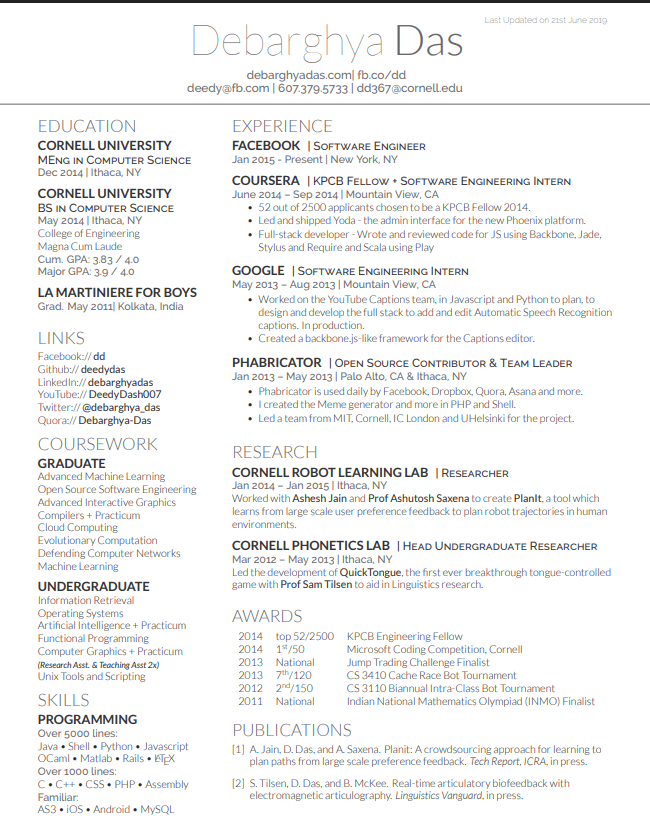
What Is the Deedy Resume or Deedy CV?
The Deedy Resume, also called the Deedy CV, is a two-column LaTeX template created by Debarghya Das. A narrow column holds compact supporting information such as education, links, coursework, and skills, while the wider column gives experience and projects more room.
That structure creates high information density and a distinctive technical look. It can suit experienced engineers with several relevant projects or skills, but it should not be used merely to squeeze weak or unrelated content onto one page.
Download the PDF above to inspect the layout, copy the LaTeX source for an Overleaf project, or import your current resume if you want to reorganize the content without editing LaTeX by hand.
How to Edit the Deedy Resume in Overleaf
- Create an Overleaf project that includes the Deedy document class and paste the template source into the main TeX file.
- Use the narrow column for concise supporting details and reserve the wider column for experience and project evidence.
- Replace every sample claim with information you can defend. Trim low-value coursework and long skill lists before reducing font size.
- Compile the PDF and test its extracted text from top to bottom. If headings and bullets appear out of order, use a single-column format for that application.
The downloadable example shows the visual structure, while the source gives you control over headings, column widths, spacing, and content order.
Is the Deedy Resume ATS-Friendly?
No template can guarantee compatibility with every applicant tracking system. Deedy's standard text and headings are useful, but its two-column reading order can be less predictable than a conventional one-column resume. The safest check is practical: export the PDF, select all text, paste it into a plain-text document, and confirm that names, dates, headings, and bullets appear in the intended order.
Choose the Jake's Resume template when simple parsing and fast scanning matter more than density. Keep Deedy when the two-column layout genuinely improves prioritization and the exported text passes your check.
Whichever format you use, stronger content matters more than the template. Review the software engineer resume bullet point examples and senior engineer resume guide before compressing the page.
Convert to Deedy Format
Upload your resume to use the Deedy format, see one detailed improvement free, and review every other opportunity detected.
Drop your resume here
or click to upload (PDF only, max 10MB)
We'll analyze your resume and show you how to improve it
How to Use Deedy Resume
Get started with this modern two-column template
Download Template
Get the PDF or LaTeX source code
Customize Content
Fill in your experience using both columns effectively
Export & Apply
Export to PDF and start applying
Frequently Asked Questions
Common questions about Deedy Resume
What is Deedy Resume?
Deedy Resume is a modern two-column LaTeX resume template created by Debarghya Das. It's designed for high information density while maintaining readability, making it popular among experienced software engineers.
Is Deedy Resume ATS-friendly?
Two-column resumes can be harder for some applicant tracking systems to parse in the intended reading order. Test the extracted text before applying, and choose a single-column template when compatibility is more important than information density.
When should I use Deedy vs Jake's Resume?
Use Deedy if you have more experience to showcase and need the extra space. Jake's single-column layout is safer for ATS systems and better for those with fewer experiences. Deedy works well for senior engineers with rich experience.
Can I customize the column widths?
Yes, the LaTeX source allows you to adjust the column ratios. The default is 1/3 for the left column (education, skills) and 2/3 for the right column (experience, projects).
Build Your Deedy Resume
Use our builder to move your experience into a clean engineering-resume format without editing LaTeX by hand
Build Your Resume NowFree to start • No LaTeX knowledge required
See plans from $5/month